SketchUp SKP
GIS File Name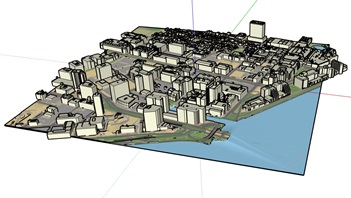
CAMB3D_[Tile Name (ex: E-2)]_2025_CityModel_SKP
Updated
April 10, 2023
Format
SketchUp
Description
The City of Cambridge Geographic Information System (GIS) City-Wide 3D project provides a detailed three-dimensional model of buildings and bridges has been compiled from many sources over several years. The SketchUp building model collection provides 3D models for modeling, model transformation, and web visualization. The model collection is segmented into tiles which is contiguous with the City of Boston 3D tile grid. Each model being assigned to the tile that its centroid falls within.
The Tiled 3D Model is a combination of terrain with a draped basemap with a collection of 3D building models. These layers have been transformed from the city's GIS data into a SketchUp model that is easy to explore and to edit. SketchUp is available free for non-commercial use.
Purpose
The City of Cambridge GIS maintains a 3D model of the city as a visualization and analytical tool for understanding ideas related to the future of the City. The Cambridge 3D model is constructed of several components: Terrain, Ground plan, and 3D models of buildings and bridges. Each of these components is shared in formats intended to facilitate collaboration between diverse communities who have an interest in understanding places in the city as they have changed or as they may be changed.
Download Tiled Data
View 3D Data Download Map
Sources
Each SketchUp model is a combination of three datasets, which are in turn created from multiple sources.
Coordinate System
Groundplan and Terrain Model: 2018 Photogrammetric measurements compiled by WSP. Updated in 2025 by Cambridge GIS.
Tile Scheme and Coordinate System:
The 5000 foot tile scheme is designed to facilitate exchange of precise georeferenced models and context information among a variety of authoring and presentation tools. The tile network covers the greater Boston area.
State Plane coordinates are offset to keep all coordinates within limits inherent in most 3D design tools.
Projected Coordinate System:
State Plane Massachusetts Mainland (Feet), North American Datum of 1983.
Vertical Datum:
North American Vertical Datum, 1988 (NAVD 88) Feet (Height)
Coordinate System Origin (Offsets)
- X: 731,100MA State Plane Feet
- Y: 2,902,900 MA State Plane Feet
- WGS84 Longitude: 71.223391 W
- WGS84 Latitude: 42.213379 N
- Elevation: 0
- Rotation to align with True North: Clockwise 0.34 Degrees.
Usage Notes
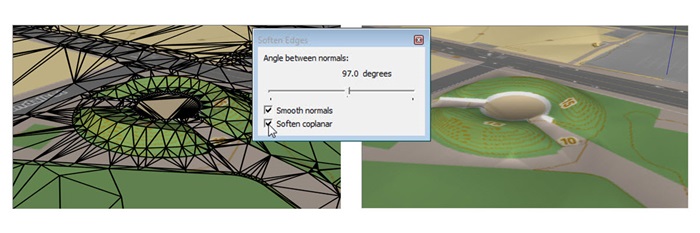
- The terrain looks better if you use the Window > Soften / Smooth Edges to soften coplanar edges within 50 Degrees.
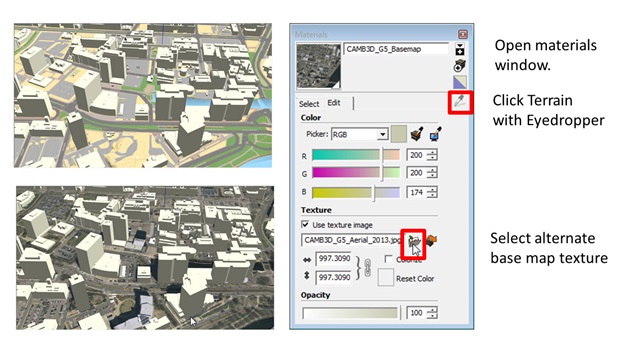
- To skin the terrain with the Ortho (Aerial photo) or a custom basemap image use the Materials > Eye Dropper to select the terrain material, then choose the desired ground plan image in the Edit tab.
-
Warning when working with SketchUp files in Rhino
Within each SketchUp tile, the ground plan texture is named Terrain_.png. Sketchup does not have a problem with this; but Rhino seems to be ignoring new texture images if it thinks that they already exist in the model. This will be fixed in our next release. In the short term, the workaround would be to download the ground plan image for each tile from the download map (Ground plan Maps tab). Then in Rhino, you should be able to find the Material properties of each terrain mesh and redirect the image reference to the appropriate image for that tile.